

A lot has been thrown at the wall in AI over the past few years. New agent features, new frameworks and new acronyms arrived every month, and most of them slid off before anyone worked out what they were for. Skills stuck. When we asked the audience at our online second AI wave session on 13 October who already knew about them, plenty did, and they're now standard in Copilot Studio. Microsoft Learn sums up the appeal in one line: create a skill once and add it to multiple agents.
What a skill is
A skill is a short set of instructions for doing one task. It has a name, a description and the steps, and it can carry a template or a script as well. Think of it as a recipe card for one job.
The first benefit is consistency. The agent carries out the same steps every time it does that task. Getting a task done once is easy, and getting it done the same way on every matter is where processes tend to fall over, with people and with agents alike. A deficiency letter that comes out with the same structure and the same checks each time is much easier for a lawyer to review.
Because you write a skill once and add it to every agent that needs it, you also fix it in one place. Improve the letter skill and every agent that uses it writes a better letter.
The agent only reads what it needs
The second benefit is about cost and accuracy, and it needs a bit of background. An agent on the new harness works in turns: it looks at where things are up to, decides what to do, does some work, checks it and goes again. Its instructions are sent with every one of those turns, which is why long instructions get expensive, as our piece on overloaded instructions shows.
Skills get around this with progressive disclosure. The name and description at the top of a skill are called its front matter, like the title on the front of the recipe card, and only the front matter is sent each turn. The agent knows it has the skill and what it's for without carrying the whole thing around.
When a contract fails a check and a deficiency letter is needed, the agent recognises it has a skill for that and only then reads the full steps. You can name a skill in the instructions if you want to be explicit, but you don't have to.
Less text on every turn means fewer credits, and the model has less to read before it acts. It also helps with context rot. Research on long-context models has found that performance can drop well before the advertised context window is full, and our rule of thumb for some models is to keep what goes in to roughly 20 to 30% of the window. A lean agent stays well clear of that.
Inside the Strata contract agent
Our demo runs on Hartley Hale & Marsh, a property law firm that exists only for the talk. Developers engage the firm to sell lots on a site, and every contract follows the same path. It lands in a shared mailbox, a Power Automate flow drops the attachments into Dataverse, and a workflow picks it up from there.
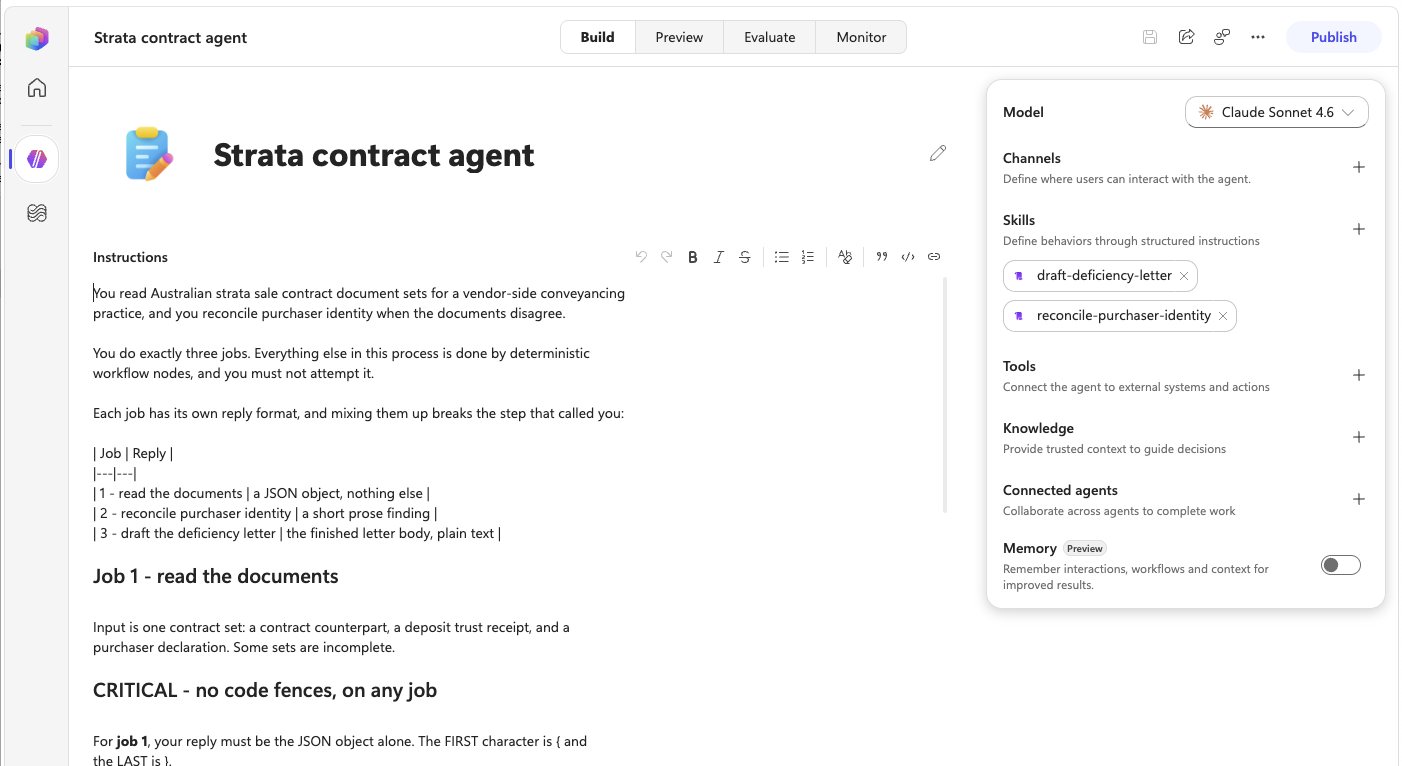
The Strata contract agent sits in the middle, and its instructions are short: "You do exactly three jobs. Everything else in this process is done by deterministic workflow nodes, and you must not attempt it." The three jobs are reading the contract documents, working out who the purchaser really is when the documents disagree, and drafting the deficiency letter. Each job has its own reply format, because a workflow step is waiting on the answer.
The deterministic checks don't need an agent. Is the deposit right? Is the lot already under contract? Is the buyer registered for GST on the Australian Business Register? Those are all workflow steps.
Two of the agent's jobs have a skill attached, draft-deficiency-letter and reconcile-purchaser-identity. The agent reads the letter skill only when there's a letter to write, and the identity skill only when the names don't line up. In one demo contract the counterpart was signed by one company and the deposit receipt named a third entity that matched neither the trustee company nor the super fund, and that's when the identity skill came into play.
The instructions say what the agent is and what it must not touch, the skills say how to do the jobs that need care, and the workflow does everything else.
What else came with the new harness
In Copilot Studio, skills come with the GitHub Copilot harness. Despite the name, it's separate from the GitHub Copilot coding product. If you're still deciding which of the three harnesses fits your process, our guide to the three harnesses is the place to start. A few other features arrived with it.
- Memory lets an agent remember your conversations with it, so if you come back four or five days later it knows where you got to. It remembers the conversation, and where a contract is up to still belongs in Dataverse.
- Connected agents let one agent hand a self-contained piece of work to another and get the result back. They suit big areas of work with their own tools and skills, and splitting small tasks across lots of agents doesn't make them any more accurate.
- Hooks are points in an agent's run, such as a tool about to be called, where a workflow can run every time. They're in preview.
Where to start
We don't only put skills inside agents. We build with them too. The whole demo was vibe coded in Claude Code with plugins, and those plugins are skills for building on Power Platform. When the build needed requirements, we had it write a skill for writing requirements and reused that.
For an agent you already have, try this:
- Open the agent with the longest instructions you've got.
- Highlight every block that's only needed some of the time, such as a letter format, the steps for one particular job or a checklist for an edge case.
- Turn each one into a skill with a clear name, a one-line description of when to use it, and the steps.
What's left in the instructions should be what's always true: who the agent is, what it does and what it must not do.