

One question is worth asking about any agent before anything else: when something goes wrong halfway through the job, who deals with it, you or the agent? That question sits underneath the biggest difference between two of the harnesses in Copilot Studio. A harness is the vehicle built around the AI model, with the model as the engine and the harness as the chassis, steering and body. There are three, and we've written a separate guide to picking one. This piece looks under the bonnet of the standard harness and the GitHub Copilot harness.
Agent comes from agency
The clue is in the name. If you have agency over something, you can make decisions and take actions within a particular domain. Think of owning a dog: you choose when to walk it and what to feed it, and inside a few guardrails the calls are yours.
Agentic automation works the same way. We give an agent tools and instructions, and the agency to choose how it carries out those instructions with those tools. The two harnesses use that agency differently. One decides everything at the start, and the other keeps deciding the whole way through.
The standard harness: plan, then run
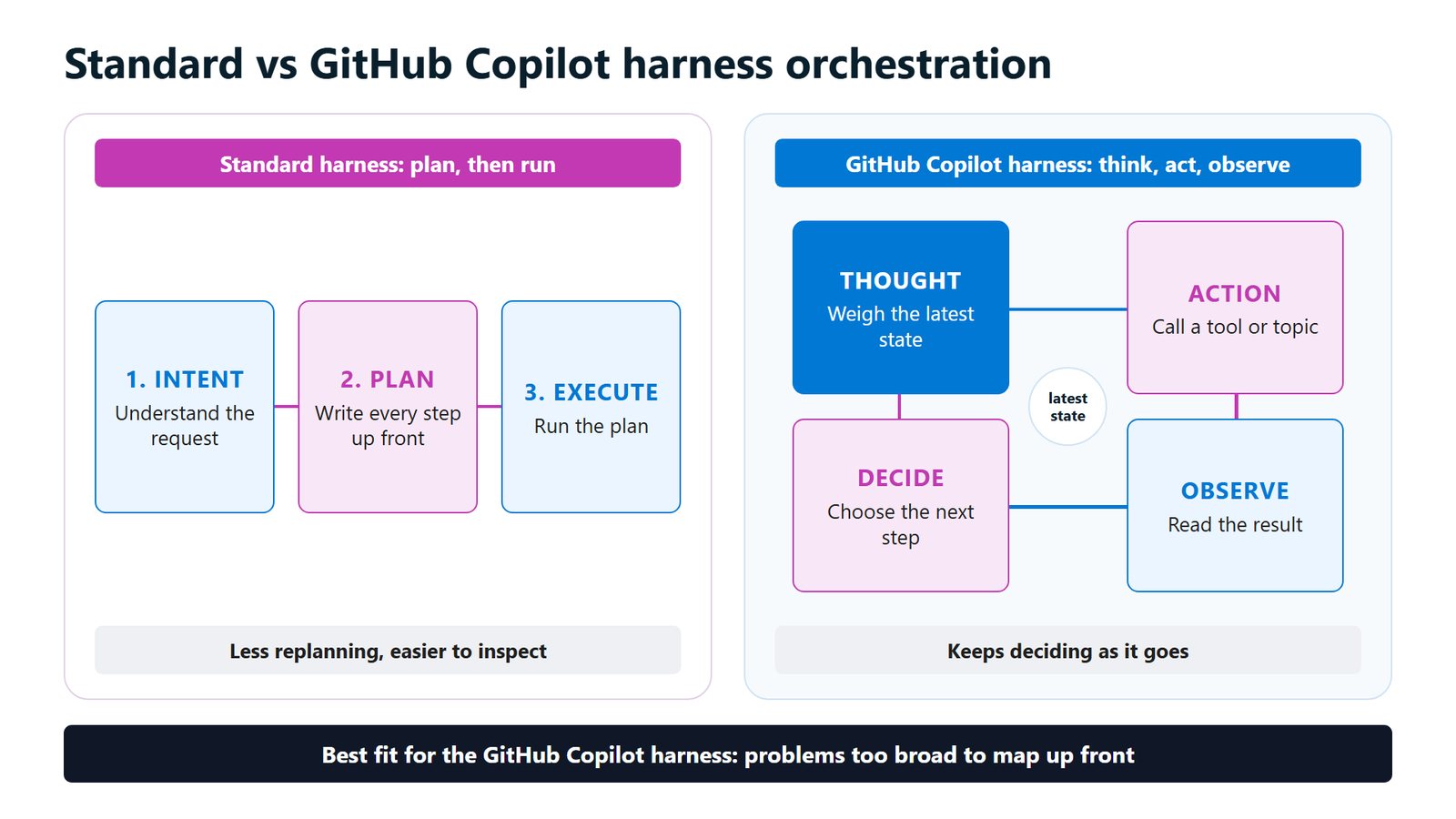
The standard harness starts with intent: what's being asked, whether it arrives through a chat, the agent's instructions or another system calling it through an API. The harness writes every step of the plan up front, then runs it.
If the plan falls over partway through, the harness doesn't stop and rethink. You handle that ahead of time with fallback topics, the catch-all paths for when the agent can't match what someone asked, and with error handling. The answer to who deals with it is you, back when you built it.
For some work that's a weakness. It's also why the standard harness is so good at what it does. There's less replanning, so the response is quick, and every step was written down before it ran, so it's easy to inspect. For turn-based conversation, where a person wants a fast response down a path you control, that's exactly right. It's like printing your directions before you leave home, which works well on a route you know.
The GitHub Copilot harness: think, act, observe, go again
If you've used a deep-thinking mode in a chat assistant, you've watched it reason before it answers. The GitHub Copilot harness, which despite the name has nothing to do with the GitHub Copilot coding assistant, works in much the same way.
Everything revolves around the latest state: where the job is up to, what's been done and what came back. From there it goes around a loop:
- In the thought step it weighs up the latest state.
- In the action step it calls a tool or a topic.
- In the observe step it reads the result.
- In the decide step it critiques that result, and either moves on or chooses the next step and goes around again.
It holds on to that state the whole time, so each trip builds on the last. That's why it handles errors better. If a step comes back wrong it notices and can retry or take another route, and if conditions change halfway through it reacts to what's in front of it.
The best fit is a problem too broad to map up front. Our demo firm, Hartley Hale & Marsh (made up for the talk), had one. Working out who was really behind one of its contracts, when a third company name turned up on the deposit receipt, needed some cognition, though not much, the kind of step our piece on rule steps and reasoning steps sets aside for an agent. Writing an if-then-else for every way that can happen would never end, which makes it work for the loop.
The loop takes more turns, so give it less to loop over
Every trip around the loop is a turn, and every turn uses the model again, with your instructions sent each time. The loop takes more turns to reach the same place, and you can't always say in advance how many. An agent might go off in one direction for a while and then come back.
The loop buys resilience and pays for it in turns, credits and predictability. The plan gives you speed and control, and pays for it when something unexpected turns up.
You don't have to pick one end. In the new harness, workflows run alongside the agent and take the deterministic steps, the if-this-then-that work where input and output are both clear. They transform, calculate, look things up and route, call the agent only where reasoning is needed, and can pause for a person with a human review step.
The firm's solution was built that way. The agent does three jobs, and the deposit, the price and the GST lookup are workflow steps. When one buyer wasn't registered for GST, a plain conditional step in the workflow caught it and the agent never got involved.
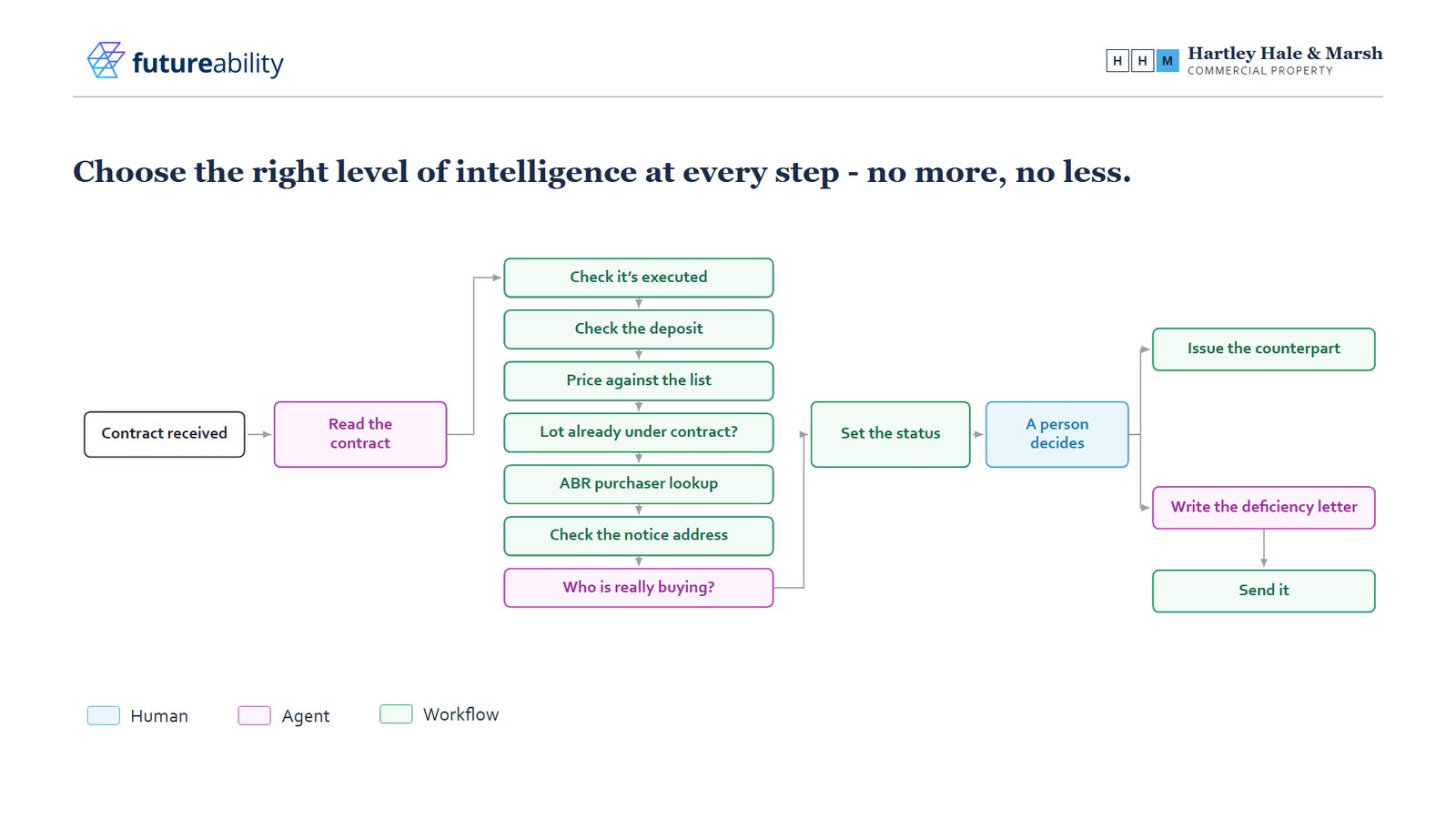
Fewer steps inside the loop means fewer turns, tighter instructions and less variation between runs, and keeping the loop small is the most direct way to make the cost of a run predictable. Our piece on credits puts illustrative numbers on it.
How to choose between the plan and the loop
Set the harness names aside and look at the shape of the work:
- Could you write every step on a whiteboard before it starts? If so, you want a plan: the standard harness for a conversation, or a workflow for a process. If you'd run out of whiteboard, that's the loop.
- What happens when something comes back messy or missing? If you can list the exceptions and write a path for each, fallback topics and error handling will do the job. If the exceptions are where the real work is, let the agent deal with them.
- How much does it matter that you can see exactly what happened and why? A plan is the easiest to inspect. If you need the loop as well, put the agent inside a workflow with a human review step.
Most real business processes end up with a bit of both: mostly plan, with a loop at the two or three steps that need judgement.
To try it, take one process you're thinking of automating and draw it out, one box per step. Next to each box write "plan" if you could describe it completely before it starts, and "loop" if you couldn't. If most boxes say loop, look again, because in our experience many of them turn out to be rules. The handful left over are where the GitHub Copilot harness earns its place.
Sources and further reading
Microsoft Learn - Harnesses in Copilot Studio
FutureAbility - Microsoft's Copilot Studio Architecture Bootcamp