

Two of the three contracts sent through the demo in our second AI wave talk got stopped. One buyer wasn't registered for GST. The other had a third company name on the deposit receipt that matched neither the trustee company nor the super fund. Both were held for a person to decide, and under the hood they couldn't have been more different: one needed a lookup and the other needed some thinking. Telling those apart, step by step, is the skill that matters now.
No less, no more
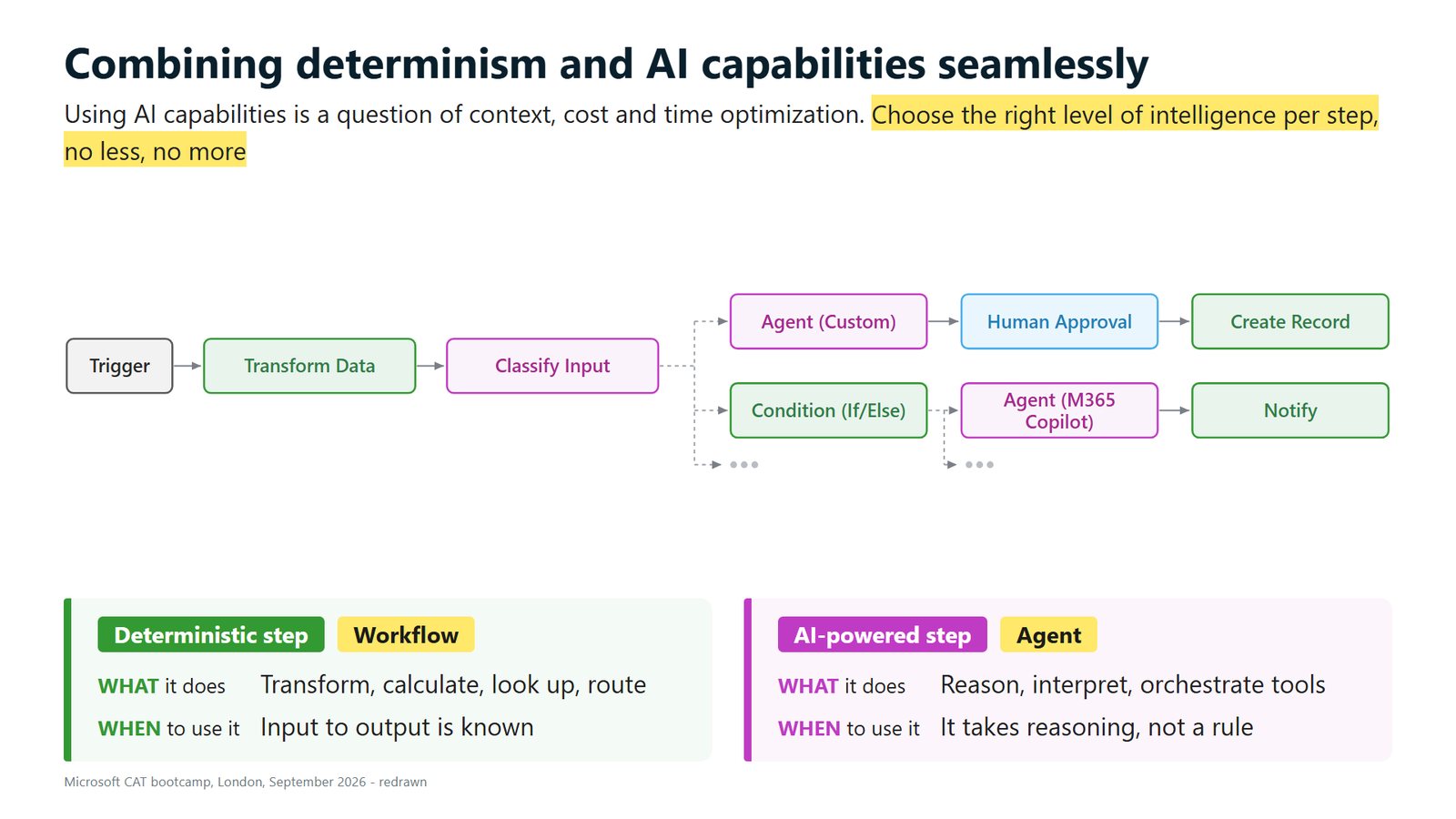
In September we spent three days in London at Microsoft's Copilot Studio Architecture Bootcamp, run by the Copilot Acceleration Team, the people who implement Copilot Studio for very large enterprises. One slide carried a line we have worked to ever since: choose the right level of intelligence per step, no less, no more.
It matched what we'd been seeing with clients. Anyone who has done automation knows that a lot of a business process is deterministic, meaning the same input gives the same output every time. If the purchase order is over $10,000, it goes to this person. Classify the email, and for this kind of email, do this. Very little intelligence is needed to move that along.
Then there are steps where writing the if-then-else statements would send you a little bit crazy. Those need reasoning, and that's the agent's job.
"No more" means don't hand a rule to a big model. "No less" means don't try to cram judgement into a rule.
Workflows for the rules, agents for the thinking
In Copilot Studio, the tool for the rules is called workflows. It's new, it works alongside the GitHub Copilot harness (the newest of the three in our guide to choosing a harness), and the easiest way to think of it is Power Automate evolved to work with agents. A workflow transforms, calculates, looks things up and routes. Use it when the input and the output are known and there's a clear path between them.
Some workflow nodes have AI built in, so you can put intelligence exactly where it's needed:
- A workflow can call an agent, hand it what it needs and get a structured answer back in JSON.
- A classify node sorts inputs using examples you give it, and you build your branches off the categories.
- A new node extracts data from documents: give it a document, it offers the fields it can pull out, and you choose.
- A workflow can call Microsoft 365 Copilot and agents built in Agent Builder directly.
- A human review step reaches a person or a group by email or in Teams, with buttons, so they can respond without opening another app.
That last one matters. An instruction is a soft guardrail that shapes what the agent does without enforcing it. A human review step pauses the process until a person answers.
What it looked like at Hartley Hale & Marsh
The demo runs on Hartley Hale & Marsh, our made-up firm that handles contracts for lots on a development site. Those contracts land in a shared mailbox, a Power Automate flow drops the attachments into Dataverse, and a workflow picks them up from there.
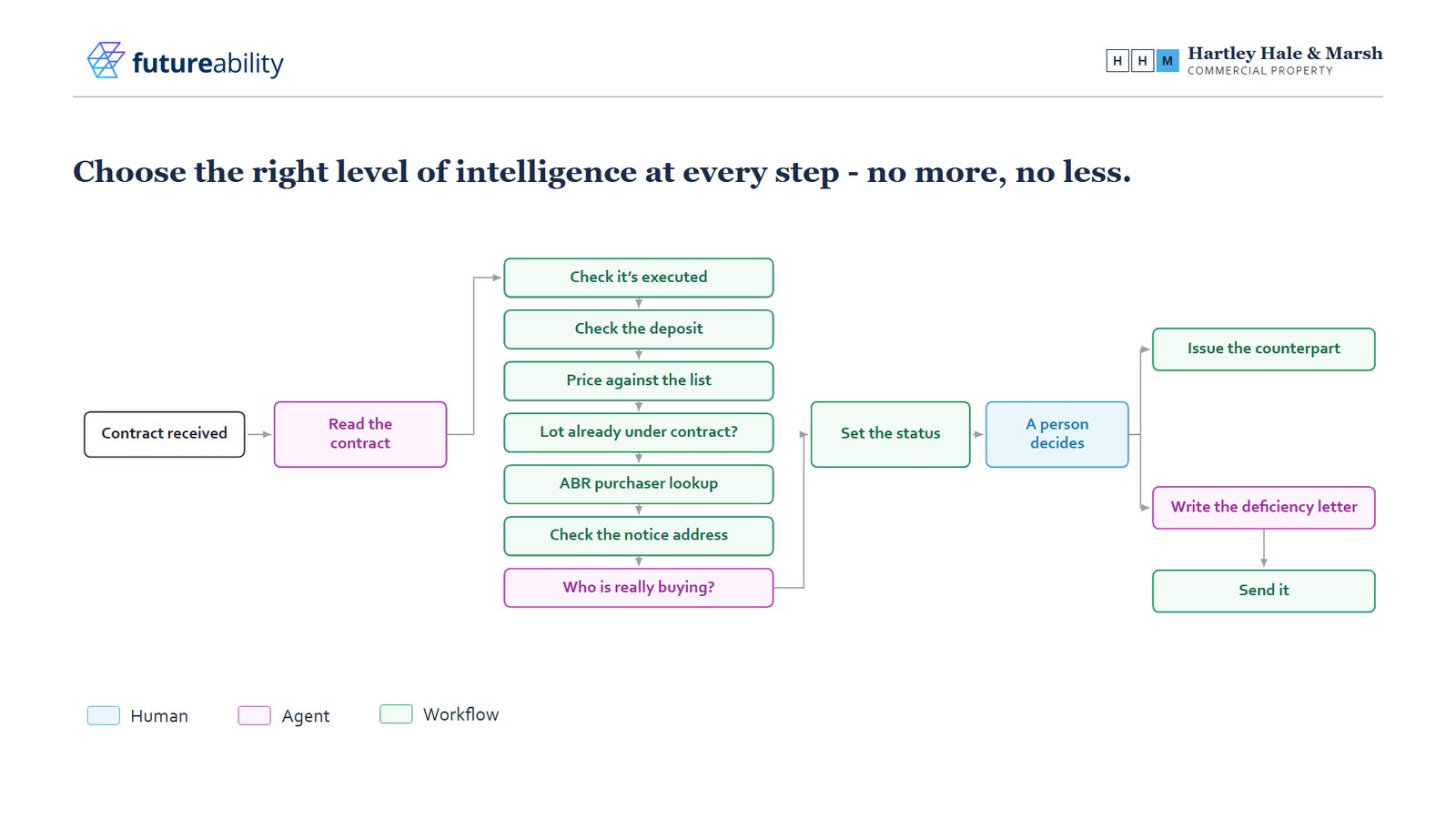
Most of it is green. Executed properly, the deposit, the price against the list, whether the lot is already under contract, the Australian Business Register lookup and the notice address are all rules and register lookups. The agent reads the contract, works out who is really buying and writes the deficiency letter when one's needed. Its instructions in the demo say exactly that: three jobs, and everything else is workflow. Then a person decides.
Back to the two exceptions. The GST one was a register check. The workflow looked up the ABN, asked whether the buyer was registered for GST, got a no and flagged it, and the letter was drafted from a template. No agent was involved in spotting it.
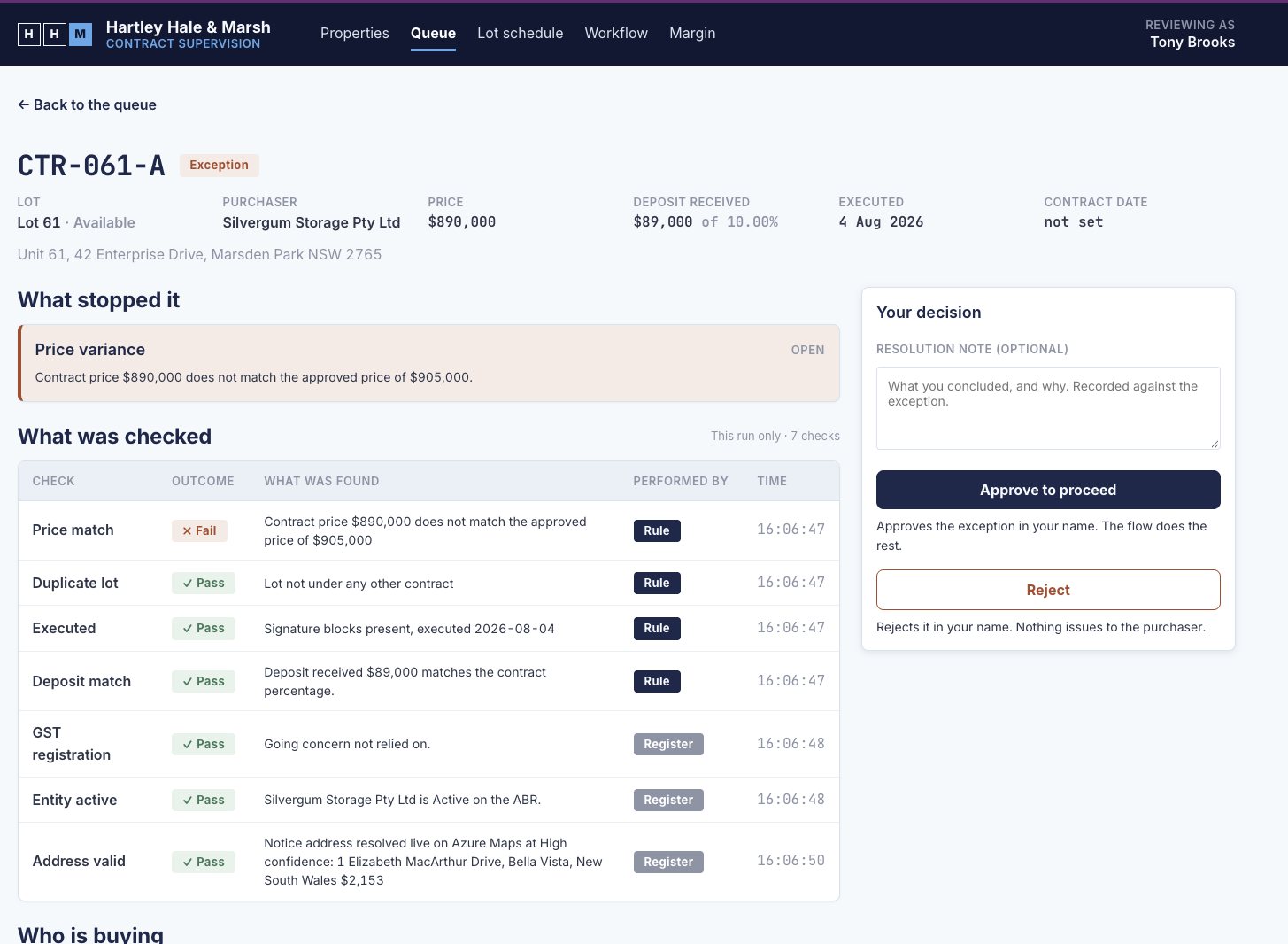
The third-name one was different. The counterpart was signed by a nominee company and the deposit receipt showed a holdings company that matched neither the trustee company nor the super fund. Try writing the rules for every way a trust, a company and a fund can be related, and every variation of a name, and you'd never finish. For an agent it's mild cognition, and it handled it easily. The person reviewing rejected that contract.
Where people fit around the agent is its own topic, and our piece on hand-overs between agents and people takes it up.
Why sorting the steps pays off
Deterministic steps are faster, and much cheaper than letting the agent do them. A workflow step still consumes credits, but a fraction of a credit, against another turn on an expensive model.
The bigger win is certainty. When an agent runs the whole process you never quite know what it'll do, and the cost of each run swings with it. Put the rules in the workflow and the only part that varies is the handful of steps that use AI, so the cost per run comes down and you can predict it. We put illustrative figures on that in our piece on credits.
Long instructions shrink as well. Every if-statement you move into a workflow is one the agent no longer re-reads on every turn. And once the AI steps stand on their own, you can choose the right model for each one.
Start by colouring in one process
To practise, colour in one process:
- Pick one process, ideally one that starts in a shared mailbox, and write down every step, including the checks people do in their heads.
- For each step, ask whether the path from input to output is known. If it is, colour it green as a workflow step.
- If it takes reasoning that a rule can't capture, colour it pink as an agent step.
- If someone has to own the decision, colour it blue, handled through a human review step or a supervision app.
Most processes come out mostly green, with a few pink boxes and one or two blue.
One warning. When people go looking for use cases they often want to put the most complex thing in first. The agent can probably do it, but it becomes a big project. Start where the pink boxes need only mild cognition, like spotting a third name on a deposit receipt, get a win and build from there.
Sources and further reading
Microsoft - Architecture Bootcamp V3, event page, decks and labs
FutureAbility - Microsoft's Copilot Studio Architecture Bootcamp
Bootcamp slide reproduced from the Microsoft CAT Bootcamp Series decks, which Microsoft publishes on the event page.